

Want to view Instagram followers and following lists without being seen?
Check Instagram followers without being seen using Peekviewer — no login required.
Try NowPublished 20 Apr 2026
How to hide your following list on Instagram without private account is a common question, but the answer is simple — you can’t fully do it. Instagram doesn’t offer a setting to hide your following list while keeping your account public, which makes Instagram privacy harder to control than many expect.
That said, there are a few small workarounds that can limit who sees it and improve your account visibility, even if they don’t completely hide it.
And if you’re on the other side — trying to understand someone’s followers or activity — tools like a private story viewer can help you see more than Instagram normally shows.
Before getting into the how, it helps to understand the why — because your reason affects how you approach how to hide your following list on Instagram.
Sometimes it’s just about keeping things personal. Who you follow can say a lot about you, and not everything feels like something you want everyone to see — especially when it comes to health, relationships, or more private interests.
Other times, it’s about avoiding awkward moments. An ex, people from your teenage years, or even coworkers might check your following list, and suddenly it turns into questions you don’t feel like answering.
It can also come down to relationships. A partner might notice new people you follow or changes in your activity. It’s not always about hiding something — sometimes you just don’t want to explain every little thing.
There’s also the social side of it. Your following list shows who you’re connected to, and not everyone wants that to be easy to figure out.
If you use Instagram for work, it matters even more. Who you follow becomes part of your image, and it can influence how people see you professionally.
And honestly, sometimes there’s no big reason at all. You just want a bit more privacy and less visibility — and that’s completely normal.
That’s why many people start looking into how to hide your following list on Instagram without private account, even though the platform doesn’t fully provide that option.
Check Instagram followers without being seen using Peekviewer — no login required.
Try NowSince Instagram doesn’t offer a direct privacy setting for your following list on public accounts, the practical options are indirect. Here’s how to hide your following list on Instagram using the tools that are actually available.
If going fully private isn’t an option, removing specific followers is the next best thing. It’s not a sweeping fix, but it works well when your concern is about particular people rather than the general public — an ex, a nosy colleague, someone from a previous job you’d rather not have watching your activity.
To remove a follower, go to your Followers list, tap the three dots next to their name, and hit Remove. They won’t get a notification, and most people never notice it happened.
One thing to keep in mind: if your account is public, removing someone doesn’t actually stop them from viewing your profile. They just become a non-follower — and on a public account, non-followers can still see everything. So this method is most effective when paired with a private account.
Blocking is the stronger move. A blocked person can’t find your profile, see your posts, or access your followers and following lists at all. As far as Instagram is concerned, you don’t exist to them.
To block someone, go to their profile, tap the three dots in the top right, and select Block.
No notification is sent — but if they go looking for your profile and can’t find it, they’ll probably put two and two together. It’s worth being prepared for that, especially with people you interact with in real life.
This one is less of a technical workaround and more of a lifestyle choice — but a lot of people swear by it. The idea is simple: keep one account public for your professional or content-facing presence, and run a second private account for everything more personal. Your private account controls who sees your following list; your public one only follows what you’re genuinely comfortable with anyone seeing.
It takes a bit more effort to manage two accounts, but if privacy is something you think about regularly, it’s probably the most sustainable long-term approach.
None of these are a perfect substitute for a simple privacy toggle — which Instagram currently doesn’t offer. But used thoughtfully, they give you meaningful control over how to hide your followers on Instagram without necessarily going private.
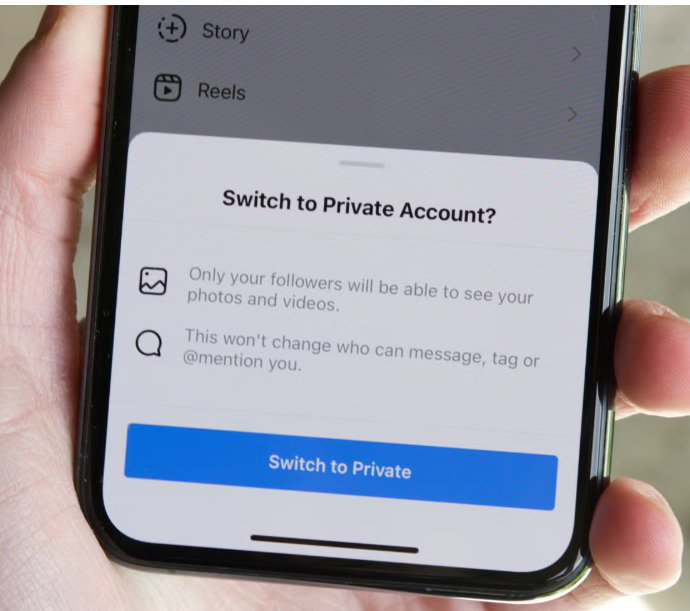
The direct answer to how to make followers private on Instagram is simple: switch to a private account. That is the only option in IG settings that fully protects your followers and following list. When your account is private:
How to hide your followers on Instagram step by step:
That’s it. The change takes effect immediately. If you’re wondering how can I hide my followers on Instagram, this is the only direct way to do it.
One thing worth knowing: switching to private doesn’t remove access for your current followers. If someone already follows you and you don’t want them to see your lists, you’ll need to remove them manually after making the switch.
Here’s the other side of this. While Instagram limits what account owners can hide, tools like Peekviewer are designed to show follower and following activity — even in cases where people are trying to figure out how to hide your followers on Instagram.
If you want to see who follows a specific account, check follower and following lists without being noticed, or understand how someone’s profile is connected, this gives you a simple way to do it.
This Instagram followers viewer works directly in your browser, so there’s no app to install and no need to log into Instagram. And the person you’re viewing won’t know you checked their profile.
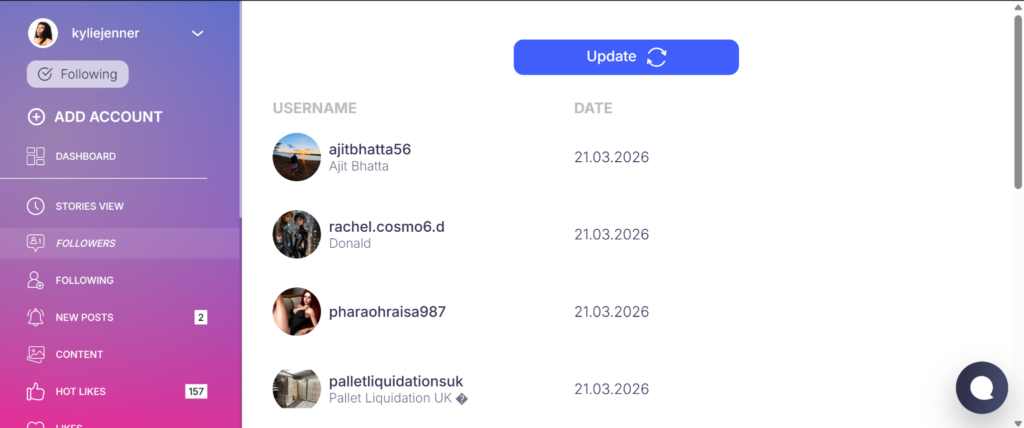
Other features include:
So, how to hide your following list on Instagram without private account? You can’t fully do it. Instagram simply doesn’t offer that option on public profiles.What you can do is limit access — by going private, removing followers, or blocking specific people.
At the same time, it’s worth knowing that complete privacy isn’t guaranteed. Tools like Peekviewer show that follower and following activity can still be viewed in some cases. In the end, it’s about understanding what’s visible and choosing how much of your social media privacy you want to control.
Can I hide who I follow on Instagram? Not really. If your account is public, anyone who opens your profile can see your following list — there’s no setting to hide it selectively. Switching to a private account is the only way to actually limit who sees it.
How do I hide my followers on Instagram from specific people? Your best options are removing them or blocking them. Removing is quieter and works well enough if your account is private — blocking is more final and cuts off all access regardless. Neither sends a notification, so most people won’t know it happened unless they go looking.
Does switching to a private account hide my following list? Yes — once you’re private, only approved followers can see who you follow and who follows you. One thing to keep in mind though: anyone already following you keeps their access. If there are specific people you don’t want seeing your lists, you’ll need to remove them separately after making the switch.
Will removing followers hide my following list? Only if you’re also on a private account. On a public profile, removing someone just means they’re no longer a follower — they can still visit your page and see everything, including your following list. To actually restrict access, you need both: a private account and manual removal of anyone you don’t want included.



How to hide your following list on Instagram without private account is a common question, but the answer is simple — you can’t fully do it. Instagram doesn’t offer a setting to hide your following list while keeping your account public, which makes Instagram privacy harder to control than many expect. That said, there are...

Someone follows you out of nowhere. A brand wants to collaborate. A competitor is suddenly growing fast. You visit their Instagram profile and get… a grid of photos and a follower count. That’s it. Instagram tells you almost nothing about what’s actually happening on an account — unless it’s yours. That’s the gap an Instagram...
You open someone’s Instagram profile, spot their highlights at the top, and hesitate. Because the moment you tap one, your name shows up in their viewer list. Instagram doesn’t give you a way around this — it tracks every single person who watches a highlight, just like it does with Instagram stories. That’s the problem...