


The Instagram friends tab is a dedicated feed filter that shows content only from the people Instagram considers your closest connections. Not everyone you follow — just the accounts you actually interact with regularly. It's Instagram's way of separating your real social circle from the broader discovery feed.
The problem is that the friends tab only shows you people who are still visible to you on Instagram. The moment someone goes private, blocks you, or removes you as a follower — they disappear completely. If you're still wondering what is the friends tab on Instagram beyond that clean filtered view — it's also a reminder of how much Instagram hides from you the moment someone changes their privacy settings. That's where a private story viewer comes in — letting you check stories and posts from any account that has dropped off your friends tab, without logging in or showing up anywhere on their end.
What Does the Friends Tab Mean on Instagram?
What does the friends tab mean on Instagram exactly? It means Instagram has identified a group of accounts you genuinely interact with — based on your behaviour, not your choices — and given them their own dedicated space in your feed.
The key distinction is that the Instagram friends tab is not something you set up manually. You don't add people to it or remove them from it directly. Instagram's algorithm builds it automatically based on how you use the app. Accounts you message, reply to, comment on, and visit regularly float to the top. Accounts you follow but rarely engage with don't appear there at all.
Think of it as the difference between your following list and your actual social circle. You might follow 800 accounts — the friends tab Instagram shows you the 20 or 30 you actually care about day to day.

Where Is the Friends Tab on Instagram?
The Instagram friends tab sits at the top of your home feed, displayed as a horizontal tab alongside other feed filters. Here's exactly how to find it:
- Open Instagram and go to your home feed.
- Look at the top of the screen, just below the Instagram logo.
- You'll see a row of tabs — For You, Following, and Friends.
- Tap Friends to switch to the filtered feed.
Is the friends tab missing on older versions of the app? If you're running an outdated version, the tab may not appear. Update Instagram through the App Store or Google Play and it should show up. If it still doesn't appear after updating, see the section below on why you might not have it yet.
What Does the Friends Tab Show?
The friends tab Instagram filters your feed down to content from accounts Instagram has identified as your closest connections. Here's what actually appears inside it:
Feed posts. Photos, videos, and carousels from people you interact with most. No suggested posts, no content from accounts you don't follow.
Stories. Stories from your closest connections appear at the top when you're in the Friends tab — the same ones that show up first in your regular story tray, but filtered to your inner circle.
Reels. Reels from accounts in your friends group appear in the tab, but only from people you interact with. No recommended reels from strangers, no content pushed by the algorithm from outside your network.
No ads. No suggestions. No noise. This is the biggest practical difference from the main feed. The Instagram friends tab is a clean, filtered view — just the people you actually follow and engage with, nothing else added in. That also means every story you tap and every profile you open is visible to the account owner — if you're wondering does Instagram notify when you view a profile, the short answer is that some activity is tracked even inside the friends tab.
Activity in Friends Tab Instagram — How the Algorithm Decides Who Appears
Activity in friends tab Instagram is determined entirely by the algorithm — and it's more nuanced than most people realise. Instagram doesn't look at who you follow. It looks at how you behave.
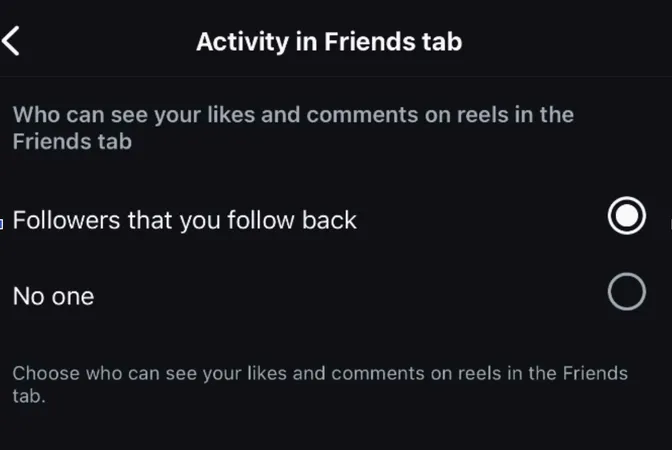
The interaction signals Instagram uses to decide who appears:
Direct messages. This is weighted most heavily. If you message someone regularly, they almost certainly appear in your friends tab. Frequent back-and-forth conversation is the strongest signal Instagram has that someone matters to you.
Story replies. Replying to someone's story — even with a quick emoji reaction — signals a close connection. Do it consistently and they stay in the tab. Stop doing it and they gradually fade out.
Likes and comments. Regular engagement on someone's posts pushes them higher. One like counts for less than a pattern of consistent engagement over time.
Profile visits. If you visit someone's profile frequently — even without liking or commenting — Instagram notices. Profile visits are a strong signal of interest, even when they're silent.
Close Friends list membership. If you've manually added someone to your Close Friends list, they will appear in the friends tab. This is one of the few ways you can directly influence who shows up.
Activity in friends tab Instagram refreshes continuously based on your recent behaviour. Accounts you were close to six months ago but haven't engaged with recently will gradually disappear from the tab. New accounts you start interacting with regularly will start appearing. It adapts to how your social circle actually changes over time.
Why Don't I Have a Friends Tab on Instagram?
The rollout hasn't reached your account yet. Instagram rolls out new features gradually, often region by region and account by account. If you don't see the Friends tab yet, it may simply not have been enabled for your account. Check for app updates first — keeping Instagram current is the fastest way to get new features as they arrive.
Your account is too new or too inactive. The friends tab Instagram needs enough interaction data to build a meaningful filtered feed. If your account is new, or if you haven't been actively using Instagram — liking, commenting, messaging, visiting profiles — there may not be enough signal for the algorithm to populate the tab. Use the app more actively and it typically appears within a few weeks.
You're using a very old version of the app. The Friends tab is a relatively recent feature. If you haven't updated Instagram in a long time, the tab won't be there. Go to the App Store or Google Play, search for Instagram, and update to the latest version.
Peekviewer for Viewing Friends' Stories and Posts Anonymously
The Instagram friends tab is useful for keeping up with people who follow you back and interact with you openly. But the moment someone goes private, blocks you, or removes you as a follower — their content disappears completely.
Peekviewer is a browser-based private story viewer that fills exactly that space. View stories, posts, and profiles from any account — without logging in, without sending a follow request, completely online, no app required.
Whether someone you used to see in your friends tab went private, or you want to view close friends on Instagram anonymously without them knowing — Peekviewer handles it.
How to set up Peekviewer:
- Open Peekviewer in your browser — no app or install needed.
- Enter the username or paste the profile link of the account you want to view.
- Confirm the profile is correct before moving forward.
- Sign up with your email — no Instagram login required at any point.
- Pick a plan and access your dashboard instantly.
Once inside, the dashboard gives you far more than just story viewing:
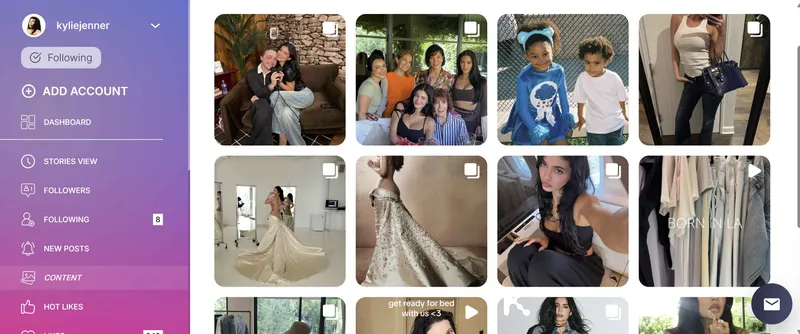
Anonymous story viewing. Watch Instagram stories anonymously with no trace left anywhere. Your name never appears in any viewer list, and no notification reaches the account owner. A full Instagram story viewer for any profile, completely without account access.
View Instagram stories online. Browse stories, posts, highlights, and reels directly in the dashboard — no Instagram app, no IG login, no risk of accidentally triggering a notification.
Private account access. Works on accounts that require an approved follow request. The Instagram profile viewer function gives you posts, stories, tagged photos, and follower lists — without sending a request or leaving any trace.
Follower and following lists. See complete follower and following data for any account, including private Instagram profiles. Useful for monitoring who's connected to specific accounts without them ever knowing you checked.
Three-month content archive. Everything stored for up to three months. Content that gets deleted or expires — stories, posts, anything captured before removal — stays accessible in your dashboard.
Complete incognito monitoring. Everything runs online, entirely without connecting to your Instagram account. No credentials at any stage. No footprint left anywhere.
Conclusion
The Instagram friends tab is one of the most useful features Instagram has added in recent years — a clean, algorithm-driven feed that filters out the noise and shows you content from the people you actually interact with. It updates automatically based on your behaviour, requires no manual setup, and gets more accurate the more you use the app.
Understanding what is the friends tab on Instagram also means knowing its limitation: it only shows you people who are visible to you right now. Anyone who went private, blocked you, or removed you drops off completely. For everything the friends tab can't show you, Peekviewer works as the silent alternative — watch Instagram stories anonymously, check profiles without showing up anywhere, and monitor any account without anyone knowing you were there.
FAQ
Yes — if you watch a story through Instagram directly, whether through the Friends tab or the regular feed, your username appears in their viewer list. Instagram logs every story view. To watch someone's story without appearing in their viewer list, you need to use an anonymous viewer like Peekviewer instead.
Not directly. The friends tab is built automatically by Instagram's algorithm based on your interaction patterns. The only indirect control you have is through your own behaviour — engage more with certain accounts and they'll appear, stop engaging and they'll fade out. Adding someone to your Close Friends list also pushes them into the tab.
No — they're related but different. Your Close Friends list is a group you manually curate for sharing stories with a limited audience. The friends tab is an algorithmically generated feed filter that shows content from accounts Instagram decides you're close to, based on your interactions. Close Friends list members do tend to appear in the friends tab, but the tab includes other accounts too.
You can't hide yourself from appearing in someone else's friends tab — that's determined by their interaction patterns, not yours. What you can control is your own activity status. Go to Settings → Privacy → Activity Status and turn it off to stop showing as active. This reduces one of the signals Instagram uses to determine closeness, though it won't remove you from someone's friends tab entirely if they interact with your content regularly.