


Someone you were following seems to have gone quiet. Their posts stop showing up, and when you check their profile, you notice you're no longer in their followers list. Instagram never tells you when this happens.
If you’re searching for how to see who unfollowed you on Instagram, there’s no alert, email, or in-app notification. The platform removed that feature years ago and hasn’t brought it back. This article covers all the methods and explains how a private story viewer can help reveal the truth about follower activity.
How to Check Who Doesn't Follow You Back on Instagram
The manual method is the most straightforward starting point — no apps, no sign-ups, nothing to install. It works best when you have a specific person in mind rather than trying to audit your entire list at once.
Go to your profile and tap Following. Use the search bar inside the list to find the person you want to check. Then open their profile, tap their follower count, and search your own username inside their followers list. If your name doesn't appear — they're not following you back.
How to check who doesn't follow you back on Instagram this way takes under a minute per account. It's reliable for individual checks and completely free. The limitation is scale — if you want to check fifty accounts, it's fifty rounds of the same process. And it only shows the current state, not what changed last week or last month. Someone could have unfollowed you three weeks ago and you'd have no way of knowing from a manual check today.
For a quick check on one or two specific people, it's the fastest option available. For anything more than that, a different method makes more sense.
How Do You See Who Unfollowed You on Instagram
Beyond checking specific accounts manually, Instagram does leave some clues — signals that tell you when something has changed in your follower list, even before you go looking for it.
Your follower count drops. This is the clearest signal of all. Keep a rough idea of your current count — if it falls by one or two overnight with no obvious reason, someone unfollowed you. Instagram shows the number. It just doesn't show who changed it.
Their name is gone from your followers list. If you remember a specific person following you and you go to your own followers list and search their username — and it's not there — they've unfollowed you. How do you see who unfollowed you on Instagram this way? Go to your own profile, tap your follower count, and use the search bar inside the list to look for specific names. It's the fastest manual confirmation available.
Their posts stop appearing in your feed. Instagram's algorithm prioritises accounts you interact with. If someone you used to see regularly suddenly disappears from your home feed — and you visit their profile directly and see they're still posting actively — something changed between your accounts. Since you still follow them, their posts should be visible. A sudden absence is worth investigating.
Private content stops loading. If someone had a private account and you were an approved follower, and their posts suddenly won't open when you visit their profile, they may have quietly removed you without blocking you. Private accounts can remove followers at any time — it's silent from your side and leaves no notification.
These are signals, not proof. A drop in follower count could be multiple people. A missing person from your feed could be the algorithm, not an unfollow. The only reliable way how to see who unfollowed you on Instagram with certainty is to check directly — or use a tool that monitors your follower list and flags changes automatically.
Website to See Who Unfollowed You on Instagram
Several browser-based tools and websites track unfollows by comparing your follower list at different points in time. The concept is sound — the execution ranges from useful to genuinely dangerous depending on which one you choose.
Most free websites to see who unfollowed you on Instagram work the same way: you connect your account, the tool takes a snapshot of your current followers, and the next time you check in it compares that snapshot to your updated list. Anyone who was there before and isn't now gets flagged as an unfollower. Simple enough in theory — but in practice, two serious problems come up repeatedly.
The login problem. Any website to see who unfollowed you on Instagram that asks for your Instagram username and password is a risk not worth taking. These tools need your credentials to access your follower list — and handing your password to an unknown third-party site is one of the most common ways accounts get compromised. Phishing sites, credential harvesting, and account takeovers all start exactly this way. If a website asks for your Instagram password to show you who unfollowed you, close the tab immediately.
The reliability problem. Free trackers are inconsistent in 2026. Instagram has updated its API multiple times in the past two years specifically to limit what third-party tools can access without authentication. Many free unfollow trackers that worked reliably in 2024 are now delayed, broken, or returning inaccurate results. You might sign up, wait for data, and get nothing useful — or results that don't match your actual follower list at all.
Knowing how to see who unfollowed you on Instagram safely comes down to one thing: finding a tool that works without your login entirely. That is exactly what Peekviewer does differently from everything else in this category.
How to See Who Unfollowed You Using Peekviewer
Peekviewer tracks followers and following lists for any account you specify — your own or anyone else's — without needing your Instagram login at any point. You stay completely incognito throughout.
It works as an Instagram followers viewer that monitors changes over time on any profile you want to check. If someone disappears from a follower list between checks, it shows up in your dashboard — which is exactly how to see who unfollowed you on Instagram without doing anything manually. No guessing, no scrolling through hundreds of names looking for someone who's no longer there.
Want to know how to check who doesn't follow you back on Instagram across multiple accounts at once? Or want to view someone's Instagram followers secretly — whether that's an ex, a competitor, or an account you're quietly keeping tabs on? This is the most reliable way to do both without triggering a single notification on their end.
How to set up Peekviewer:
- Open Peekviewer in your browser — no app or install needed.
- Enter the username or paste the profile link of the account you want to monitor.
- Confirm the profile is correct before moving forward.
- Sign up with your email — no Instagram login required at any point.
- Pick a plan and access your dashboard instantly.
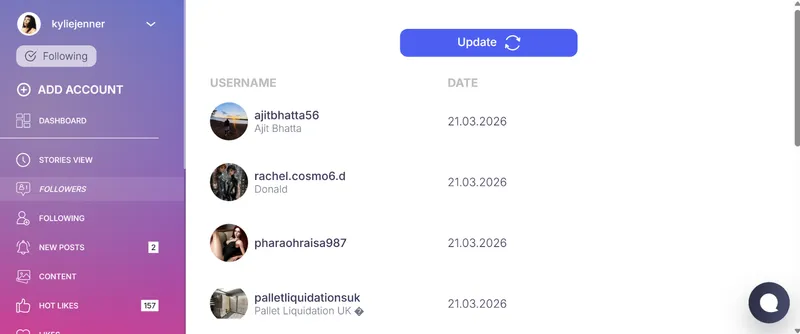
Once inside, the dashboard gives you far more than just follower tracking:
Follower and following lists. Full lists for any account, updated regularly. Compare past and present to see exactly who dropped off. Works on public profiles and private Instagram accounts.
Three-month archive. Everything stored for up to three months. If you want to know how to see who unfollowed you on Insta — or track follower changes on any other account you're monitoring — it's all there in your dashboard, not just what changed right now.
Anonymous story viewing. Watch Instagram stories anonymously with no trace left anywhere. Your name never appears in anyone's viewer list, and no notification reaches the account owner. Use it as a full Instagram private account story viewer for any profile, completely without account access.
View Instagram stories online. Browse stories, posts, highlights, and reels from any profile directly in the dashboard — no Instagram app, no login, no risk of accidentally liking something or triggering a notification.
Private account access. The Instagram profile viewer function works on accounts that require an approved follow request. You see everything — posts, stories, tagged photos, follower lists — without sending a request or showing up anywhere on their end.
Tagged photo monitoring. Includes photos the account owner has since removed or untagged themselves from — useful for tracking changes in someone's profile over time.
Incognito browsing throughout. Everything runs online, entirely without connecting to your Instagram account. No IG credentials involved at any stage of the process.
Conclusion
How to see who unfollowed you on Instagram comes down to three options: check manually for specific accounts, use a third-party website that compares follower snapshots, or use a dedicated monitoring tool that doesn't require your Instagram login.
The manual method works for one-off checks on specific people. Free websites work to a point — but most ask for your password, which puts your account at risk, and many are unreliable in 2026 after Instagram's API changes. Peekviewer gives you ongoing follower monitoring, complete follower and following lists, and a three-month history of changes — for your own account or any other account you want to keep tabs on — without ever touching your Instagram credentials.
How do you see who unfollowed you on Instagram reliably, safely, and without handing over account access? Whether it's your own followers or someone else's, Peekviewer tracks it all without leaving a trace.
FAQ
Instagram doesn't keep a record of unfollow history — for your own account or anyone else's. The only way to track it is by comparing a following list against a previous snapshot. Peekviewer does this automatically for any account you want to monitor, not just your own.
The clearest signs are a drop in your follower count, their name disappearing from your followers list, or their posts becoming less visible in your feed. None of these come as immediate alerts. A monitoring tool that tracks follower lists automatically is the most reliable way to catch unfollows as they happen.
It depends on what the app asks for. The safest way how to see who unfollowed you on Instagram is to use a tool that never asks for your Instagram password — like Peekviewer, which works without connecting to your account at all. Always check what credentials a tool needs before signing up.
No. Instagram removed unfollow notifications years ago and hasn't brought them back. No alerts, no emails, no in-app indicators. The only way to find out is to check your follower count manually, search specific names in your followers list, or use a monitoring tool that tracks changes over time