


Your Instagram account locked situation can feel confusing and frustrating. One minute everything is working fine — the next you're facing a message about unusual activity, a disabled account, or a verification step you can’t get past.
If you need to unlock Instagram account, here’s the key thing to understand: Instagram locks accounts for different reasons, and the solution depends entirely on what triggered the lock.
This guide breaks down every type of lock, explains exactly how to unlock Instagram account in each case, shows what to do when the usual recovery steps don’t work, and how a private story viewer can help you stay connected in the meantime.

Why Is My Instagram Account Locked?
If you’re asking why is my Instagram account locked, it usually comes down to Instagram’s automated security system. The platform locks accounts automatically — no human reviews anything at this stage. An algorithm flags something, and the lock happens instantly. That also means accounts can get locked incorrectly, even when no rules were actually broken.
The most common reasons your Instagram account locked:
Too many failed login attempts. Three or four wrong passwords in a row and Instagram locks the account as a security measure. Most common type of lock. Easiest to fix.
Login from an unusual location or device. If someone — or something — attempts a login from a location Instagram doesn't recognise, it flags it as suspicious and locks the account immediately.
Third-party app activity. Scheduler tools, follower trackers, or any app connected to your IG account can trigger a flag. Instagram treats rapid automated actions — bulk likes, fast follows, unusual posting patterns — the same whether a human or an app is doing them.
A community guidelines violation. Post something the algorithm considers a violation and the account gets disabled. The most serious type. Hardest to reverse.
Following, liking, or posting too fast. Instagram has hourly and daily action limits. Hit them and you get a temporary action block — usually 24 to 72 hours, no way to speed it up.
Identity verification required. Instagram occasionally asks users to confirm they're a real person, particularly after a recent password, email, or phone number change.
Knowing which one you're dealing with is the first step. The lock screen itself usually tells you — each type shows a different message.
Instagram Account Locked — What It Looks Like
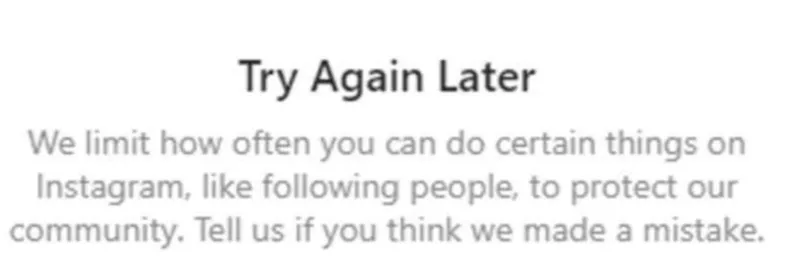
Before doing anything, identify the exact screen you're seeing. Each one points to a different problem and a different fix.
"We detected unusual login activity" — Instagram flagged a suspicious login. Wrong location, unfamiliar device, or too many failed attempts. Straightforward fix.
"Your account has been disabled for violating our terms" — The serious one. Instagram has decided the account broke a rule, either through algorithm detection or a manual review. Requires an appeal.
"Try Again Later" — A temporary action block. Usually appears after too many likes, follows, or comments in a short period. No appeal process — you wait it out.
"Verify your identity to continue" — Instagram wants confirmation you're a real person. Can appear without warning even on accounts that haven't done anything unusual. Fixable with identity verification.
How to Unlock Your Instagram Account: Suspicious Activity Lock
This is the most common situation — Instagram detects unusual behavior and temporarily locks your account to protect it. If you're wondering how to unlock your Instagram account, follow these steps to regain access quickly and securely.
Step 1. Open Instagram and tap “Get More Help” on the lock screen.
Step 2. Choose “Send SMS” or “Send Email” — whichever you can access. Instagram will send you a 6-digit code.
Step 3. Enter the code. It expires in about 10 minutes, so don’t wait too long.
Step 4. Follow the prompts. You might be asked to do a quick selfie check — just move your head slowly as the camera guides you. It takes about 30 seconds.
Step 5. Once you’re verified, you’ll be logged back into your account.
If the code doesn’t show up, check your spam folder first. Still nothing? Tap “Resend” and give it a couple of minutes before trying again.
If your account was disabled for a policy violation, the process is different:
Step 1. On the disabled screen, tap “Learn More.”
Step 2. Tap “Request a Review.”
Step 3. Enter your name and email. In the explanation, keep it simple — say you believe the account was disabled by mistake and request a review.
Step 4. Submit and wait. Responses can take anywhere from 24 hours to several weeks. If it’s rejected, you can try once more with extra details.
One thing that genuinely helps when trying to unlock Instagram account after a violation: if you have a business account connected to a Facebook page, submit your appeal through Facebook’s Account Quality Center instead. It usually gets reviewed faster than going through Instagram directly.
How Do I Unlock My Instagram Account If I Can't Access My Email or Phone?
This is where the standard methods break down. If you've lost access to the recovery email or phone number linked to the account, the verification codes never reach you. Here's how do i unlock my instagram account in this situation:
Step 1. On the login screen tap Forgot Password, then Get More Help at the bottom of the screen.
Step 2. Enter your username and tap Next.
Step 3. Tap Need more help at the bottom.
Step 4. Select I can't access this email or phone number.
Step 5. Instagram walks you through a manual identity verification process. In most cases it requests a government-issued ID — passport or driving licence. In some cases it asks for a short video selfie where you confirm your identity on camera.
Step 6. Submit the request and wait. This is fully manual, reviewed by a person, and slow. Realistically expect at least one week before hearing back — sometimes longer.
The honest limitation: this doesn’t always work. If you're trying to figure out how to unlock Instagram account, keep in mind that accounts with limited personal information — no verified name or linked phone number — are harder for Instagram to verify, so rejections are more common. This is also why knowing how to see if you are blocked on Instagram can help rule out other issues affecting your access.
What to Do While Your Instagram Account Is Locked — Use Peekviewer
The waiting is often the hardest part. While your Instagram account locked status isn’t resolved — whether it’s 24 hours or several weeks — you lose access to everything: stories, profiles, and the content you check daily.
If you're trying to figure out how to unlock Instagram account, it’s important to know that recovery can take time depending on the issue. In the meantime,Peekviewer can help you stay connected.
This is a browser-based Instagram profile viewer that works independently of your Instagram account. No login needed — just enter a username to view stories, posts, and profile data online. It’s also useful for monitoring accounts and browsing incognito.
Nothing appears in the account owner’s viewer list, and your activity isn’t visible to them. Since it runs entirely in your browser, this Instagram story viewer works even if your Instagram account is locked, disabled, or unavailable. It’s a practical way to view private Instagram profiles anonymously while you’re waiting to regain access.
How to set up Peekviewer:
- Open Peekviewer in your browser — no app or install needed.
- Enter the username or paste the profile link.
- Confirm the profile is correct.
- Sign up with your email (no Instagram login required).
- Pick a plan and access your dashboard.
That’s it — you can view Instagram stories online, while stories, posts, and follower data load instantly and stay saved for up to three months.
What Peekviewer gives you while your Instagram account is locked:
- Watch Instagram stories anonymously without account access — your name never appears in the viewer list
- Access posts, reels, and highlights from profiles you normally follow
- View follower and following lists, including private Instagram profiles you can’t access directly
- See tagged photos, even ones the account owner has removed
- Access deleted content if it was captured before it disappeared.
Conclusion
Having your Instagram account locked is frustrating — but in most cases, it’s not permanent. The key is understanding what to do when Instagram account is locked and staying calm. Different locks work differently. Suspicious activity locks are usually fixed in minutes after identity verification. Action blocks (from liking or following too fast) clear within 24–72 hours. Policy violations take longer and aren’t guaranteed, but appeals through Facebook’s Account Quality Center often work faster.
If you're still trying to figure out how to unlock Instagram account and the wait drags on for days or even weeks, it can feel like you’ve lost access completely. In that case, tools like Peekviewer can help you keep up with the content and profiles you care about while you wait. Even after your account is restored, this Instagram private account story viewer can still be useful — whether you want to view stories anonymously, check profiles that have blocked you, or browse without logging in.
FAQ
It depends entirely on the type of lock. If you're trying to unlock Instagram account, keep in mind that suspicious activity locks clear within minutes after identity verification. Temporary action blocks lift automatically within 24 to 72 hours — there’s no way to speed that up. Policy violation appeals can take anywhere from 24 hours to several days, depending on the case.
On the disabled screen, tap Learn More → Request a Review. If you're trying to find how to unlock Instagram account, this is the key step. Explain that the disable was a mistake, submit your details, and send the appeal. You can retry once if rejected, but a second rejection is usually final. For business accounts, Facebook’s Account Quality Center is often faster.
Use the "Need more help" option on the login screen and go through the manual identity verification route. Instagram will ask for a government-issued ID or a short video selfie. This is a fully manual process — expect at least a week, sometimes longer, before receiving a response.
Yes. Peekviewer works entirely without an Instagram account. Enter any username and it loads their stories, posts, and profile data into your personal dashboard — completely anonymously, with no trace left on any profile you visit. Your locked account status has no effect on how it works.